

Live Chat Support for PR Orders: When to Use It and When to Use Something Else
Sometimes you just need a quick answer. Where is the invoice? How does this filter work? Which of these two packages fits a product launch? Opening a ticket for a ten-second question feels heavy, and waiting for an email feels slow. That is the job of live chat support: a small window where you type a question and get a person, not a form.
This guide explains how the Coneberry live chat works, what it is best used for, what it is not for, and how it fits with the other ways to reach the team. It is written for people who have not used Coneberry before, so we start with a short explanation.
What is Coneberry?
Coneberry is one place to get articles and press releases published on real news and business websites, so a brand builds its reputation and authority online. You browse more than 5,000 publications in the client dashboard, choose sites or PR packages, send your content (or ask Coneberry to write it), approve it, pay, and receive live links. Browsing needs no account, and signing up is free.
Also worth a look: Browser Notifications: Never Miss a Message or Live Link and Messages, Emails and Notifications: How Coneberry Keeps You Informed.
Where is the live chat?
A chat bubble appears at the bottom right of the dashboard on computers and tablets. It is hidden on phones, where screen space is tight, so on a phone you use order messages, a support ticket or email. Press the bubble, type your question and send it. The reply appears in the same window.

The chat bubble sits at the bottom right of the dashboard.
What is the live chat best for?
Think of it as a quick question desk. It works well for:
- How-do-I questions. How do I filter by do-follow links? Where do I see my total invested? How do I send a Google Docs link?
- Choosing. You are comparing sites or PR packages and want a second opinion. The guided quiz Find my sites also helps with this.
- Locating things. Where is the invoice, the list of live links or the notification setting?
- Before you sign up. You can ask about the service while you browse, with no account.

You can ask about any publication card while you browse.
How quickly will you get a reply?
Replies usually arrive within one working day, and faster when someone is online. Times in the dashboard use US Eastern time, which helps when you are planning around working hours.
When is live chat the wrong tool?
The chat is deliberately light. Some questions deserve a place where the whole history is visible and attached to the right record.
Questions about one order
Use the order’s Messages chat. It holds your content, drafts, invoice and live links, and the team sees the full context. You can send text, links and files up to 10 MB, and replies appear without refreshing.
Account problems and longer issues
Open a ticket on the Support page. A ticket keeps a record, and replies arrive by email as well as in the dashboard. Our guide to support tickets explains when this makes sense.
You prefer email
Write to support@coneberry.com. It reaches the same team.
For a side-by-side view of all channels, read how communication works on Coneberry.
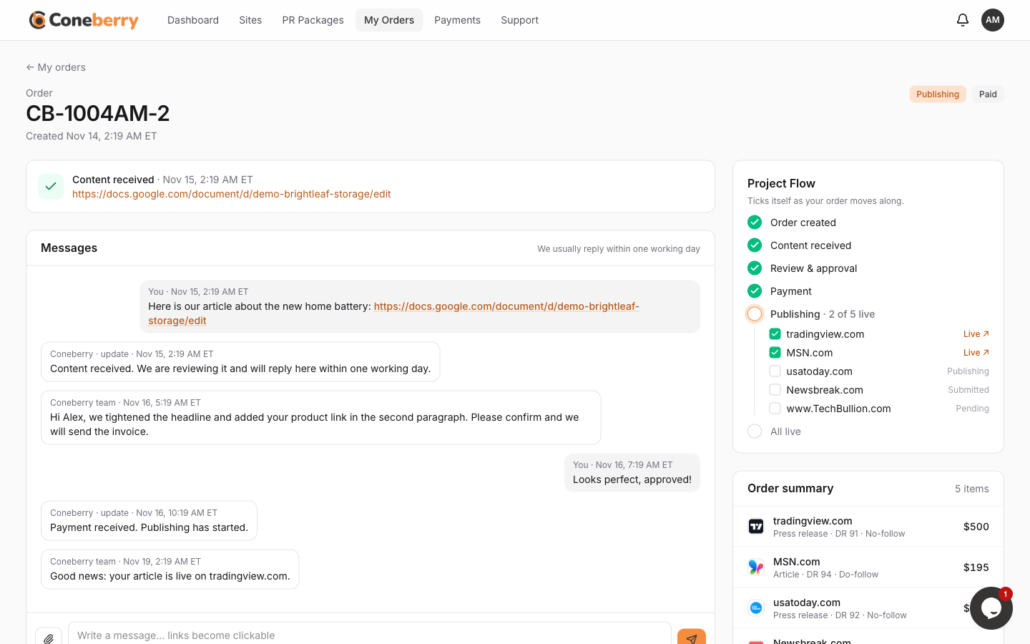
Order-specific questions belong in the order's Messages chat.
What should you never put in a chat?
Coneberry never asks for card details, passwords or one-time codes in a chat or email, and you should never send them. Payments are made on the secure page that opens when you press Pay now. Treat any message that asks for these as suspicious and tell support.
Tips for a fast answer
- Be specific: name the page, the filter or the order number (for example CB-1001JD-1).
- Put one question per message, or number them.
- Say what you were trying to do and what happened instead.
- Share a link rather than describing a page.
Examples of good chat questions
To give you a feel for it, here are the kinds of questions that get a fast, useful answer. “I want articles about fintech on sites with DR above 50 and do-follow links. Which filters should I use?” “I have a product launch next month and a modest budget. Would a PR package or a few individual sites suit me?” “Where can I see all the links that went live for my order?”
Each one is short, specific and about one thing. If the answer needs a record that stays with an order, such as agreeing a change to your content, the team may suggest continuing in the order’s Messages, where everything is saved beside your checklist and invoice. That is normal, and it keeps the history in one place.
You can also point the chat to the help center for background reading. The Coneberry help center has short articles on ordering, payments and your account.
The live chat also works well alongside the rest of the dashboard. While you browse, you might notice a term like DR, do-follow or traffic that you are not sure about. Words with a dotted underline show an explanation when you hover or tap, and the chat is there for anything that the tooltip does not cover. Our glossary collects these terms in one place, so you can read it before you ask.
Frequently asked questions
Why can I not see the chat on my phone?
The bubble is hidden on phones. Use your order Messages, a ticket or email.
Do I need an account to use the chat?
You can ask questions while browsing the dashboard. For anything about an order, use the order Messages, since that is tied to your account.
Is the live chat a person or a bot?
The chat is there to reach the Coneberry team. If you want a written record that stays with an order, use the order’s Messages.
What if my question is urgent?
Start with the live chat or the order Messages, and mention that it is time-sensitive. Replies usually come within one working day.
Try it while you browse
The easiest way to see how it works is to open the dashboard and look around. Browse the publications for free and use the bubble when you have a question: dashboard.coneberry.com/user/sites.
More step-by-step help is in the Coneberry Help Center.


