

Introducing the Coneberry Client Dashboard: Every Article, Press Release and Live Link in One Place

Today we are launching the Coneberry client dashboard, a single place where you can choose publications, order articles and press releases, send your content, approve it, pay and collect every live link. It replaces the email back-and-forth that publishing used to need, and it is free to use. You can open it right now at dashboard.coneberry.com.
If you are new to Coneberry: we help brands get articles and press releases published on real news and business websites, so that customers, investors and journalists find trusted coverage when they search for you, and so that AI assistants such as Google AI, ChatGPT and Copilot have credible sources to mention you from. Better search rankings from the links are a welcome bonus. The dashboard is how all of that now happens.
Why we built a client dashboard
Ordering media coverage has traditionally meant spreadsheets of sites, long email threads, invoices in one inbox and live links in another. Clients asked us the same questions again and again: which sites suit my industry, what does a published article look like, where is my order, and where are my links? The dashboard answers each of these on screen, at any hour, without waiting for a reply.
Also worth a look: Coneberry FAQ: Your Questions About Articles and Press Releases Answered and PR and Guest Posting Glossary: DR, Do-Follow, Traffic and More.
- Transparency: every publication shows its domain rating, monthly traffic, link type and a real sample article before you order.
- One place for each order: content, messages, approvals, invoices and live links all sit on the order page.
- Results you can share: your published links are collected automatically, ready to copy or download.
What you can do in the Coneberry client dashboard
Browse 5,000+ publications
The Sites page lists every publication we work with as a card or a table. Filter by price, domain rating, traffic, country, category and link type, or search by name. Every card has a Sample link to a real article on that site, and we check those samples every week.

The Sites page: every publication with its metrics and a real sample article.
Not sure where to start? Find my sites asks six short questions about what you want to publish, your budget and your audience, and suggests matching publications.
Order PR packages
On PR packages you can send one press release to a whole network of sites for one price: finance networks with Yahoo Finance and Business Insider, US local and TV news networks, Indian news networks, and AI search listings. Each package shows what is guaranteed and links to a sample report from an earlier release.
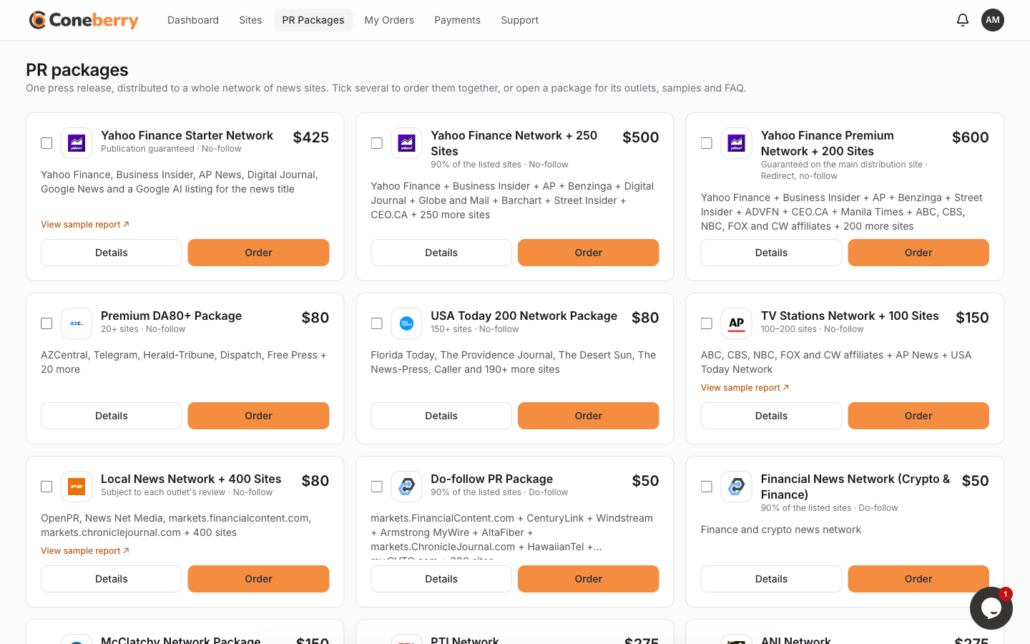
PR packages, each with its outlets, guarantees and a sample report.
Send content, or let us write it
Once you place an order, the order page asks whether you already have the content. Paste a Google Docs link, or choose No, please write it for me and answer a short questionnaire about your news and your company. Our team reviews everything, usually within one working day, and nothing is published without your approval.
Follow every order live
Each order has a Project Flow checklist that moves from content received to review, payment and publishing, with a line for every site that turns to Live when the article goes up. Messages with our team sit next to it, and replies appear by themselves.
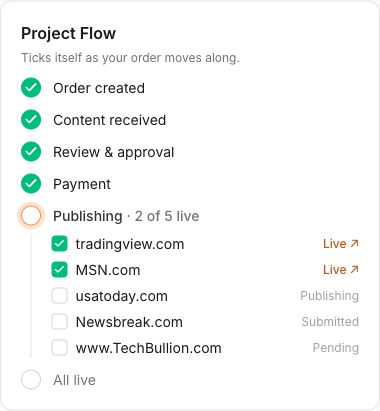
The Project Flow shows exactly where your order is, site by site.
See all your results on one screen
Your dashboard home counts the links published, orders placed and combined readership, and shows a wall of logos of every publication you have appeared on. Click a logo to open the article, or copy and download the full list for a report or a pitch deck.
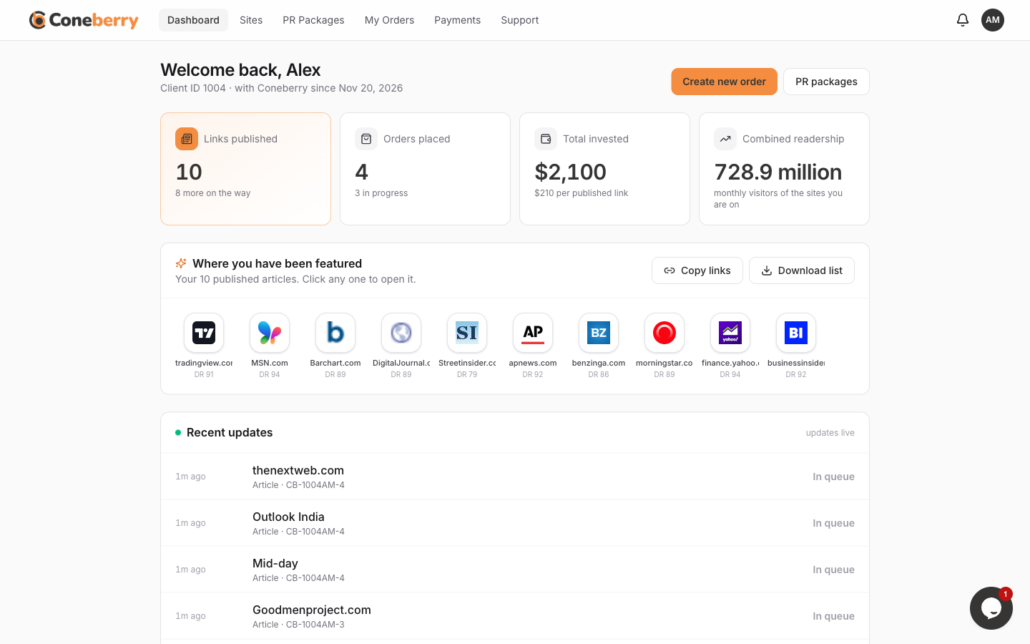
Your dashboard home: links, readership and every publication you appear on.
How to get started
- Browse first, no account needed. Open the Sites page and look around.
- Create a free account with Google or your email when you are ready to order. You stay signed in on your device for six months.
- Tick the sites or packages you want and press Create order. Placing an order costs nothing upfront.
- Send your content or ask us to write it, then approve the final version.
- Pay the invoice on the order page. Payment is made in full after review and before publication, through a secure payment page.
- Collect your live links as each publication goes up. You get an email and, if you turn them on, a browser notification for each one.
Help whenever you need it
Questions about an order go in its Messages. For anything else there is live chat on computers and tablets, support tickets in the dashboard, and email at support@coneberry.com. Our Help Center and the Knowledge Base articles on this blog explain every step, from choosing publications to what happens after your links go live.
Frequently asked questions
Does the dashboard cost anything?
No. Creating an account and browsing are free. You pay only for the articles and press releases you order, and only after your content has been reviewed.
I already work with Coneberry. Do I need to do anything?
Sign up with the email address you use with us, and new orders will run through the dashboard. Our team can help you move any open work across.
Are the site metrics guaranteed?
Domain rating, traffic and link type come from third-party tools and from the publishers, and they can change over time. We keep them up to date, but they are estimates, not guarantees.
Is my order confidential?
Yes. Your orders, content and messages are visible only to you and the Coneberry team. The published articles themselves are public, as they are meant to be.
Start exploring today
The fastest way to see what the dashboard can do is to open it. Browse 5,000+ publications for free, no account needed, and place your first order when you are ready.
More step-by-step help is in the Coneberry Help Center.


