

Website Traffic Numbers Explained: What They Mean When You Choose Publications
A big number next to a website’s name looks reassuring. Half a million visitors a month sounds better than ten thousand. But what does website traffic actually measure, where does the number come from, and should it decide where your article or press release goes?
This guide explains traffic estimates in plain English. It also shows where to find and filter them on Coneberry, a dashboard where brands publish articles and press releases on 5,000+ real news and business websites.
What does website traffic mean?
Traffic is the number of visits a website receives, usually measured per month. One person who comes back three times in a month counts as three visits. Some tools also report “unique visitors”, which count each person once.
Also worth a look: What Is Domain Rating (DR)? How to Use It When Choosing Publications and Do-Follow vs No-Follow Links: What They Mean for Your Brand.
On Coneberry, the Traffic figure on each publication card is the estimated monthly visits to the whole site.
Where do traffic numbers come from?
Only the website owner sees exact traffic, in their own analytics. Everyone else relies on estimates. Third-party tools build them from large samples of browsing data, search data and other signals. Publishers also report their own figures.
This means:
- Different tools give different numbers for the same site.
- Small sites are harder to estimate than large ones.
- Numbers change from month to month.
Coneberry takes figures from third-party tools and publishers, and they can change. They are not guaranteed.

The Traffic figure sits next to DR, country and link type on each card.
Why does traffic matter?
It shows scale
A site with a large audience gives your content a bigger potential pool of readers. Traffic is a simple way to tell a busy news site from a small blog.
It hints at authority
Sites that people visit often tend to be better known, which adds to the credibility of being published there. See How publications build your brand reputation and authority.
It helps you filter
When you browse thousands of publications, a traffic filter lets you set a minimum and remove the very small sites in one step.
What traffic does not tell you
- It is not your article’s audience. The figure counts visits to the whole site, including the home page and every section. Your article is a single page and will get only a share of those visits, if any. No one can promise a number of readers.
- It does not show who visits. A site can attract many visitors from countries you do not sell to.
- It does not show quality. A busy site is not automatically a trusted one.
- It does not predict rankings. Google does not index or rank your page because the site is busy. Indexing and ranking improvements are never guaranteed.
Traffic, DR and relevance: how do they fit together?
Traffic and Domain Rating answer different questions. Traffic asks how many people visit. DR asks how strong the site’s links are. A site can be strong on one and weak on the other. Read What is Domain Rating (DR) and why it matters to see the difference.
Relevance sits above both. A finance startup gets more from a finance site with 40,000 monthly visits than from a general-interest site with 400,000, because the first audience is the one that might become customers.
How do you use traffic on Coneberry?
- Open Sites.
- Open the Traffic filter in the left panel and set a minimum if you want one.
- Add the category and country filters to match your audience.
- Sort by traffic if you want the busiest sites first, or by price if you have a budget.
- Open the Sample link on any card to look at a real published article.
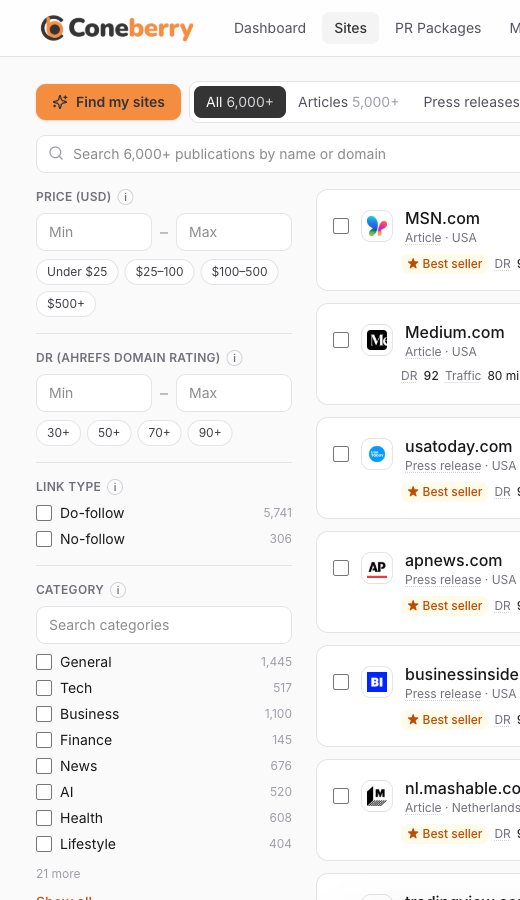
The left-hand filters include traffic, DR, price, link type, category and country.
Prefer guidance? The Find my sites quiz asks about audience and traffic along with the type of content, budget and DR, then suggests matching sites. Dotted-underlined words such as Traffic show a plain explanation when you hover or tap.
Common mistakes to avoid
- Choosing only by the biggest number. Fit matters more than size.
- Expecting clicks. A publication’s visitors are not automatically visitors to your article.
- Treating estimates as facts. They are approximations from third-party tools.
- Ignoring the sample. Reading a real article shows you the site’s quality in seconds.
A short example
Suppose you are choosing between two publications for a press release about a new cybersecurity tool. One has an estimated 800,000 monthly visits and covers general news. The other has 60,000 and covers technology and security. The first looks far bigger. But most of its visitors are not looking for security news, while nearly all visitors to the second are. For this release, the smaller site may reach more of the right people.
Practical tips for choosing by traffic
- Set a floor, not a target. Use the traffic filter to remove very small sites, then choose from the rest by relevance.
- Match the country. Traffic from the wrong country adds little for you. Use the country filter alongside traffic.
- Mix sizes. A shortlist with one or two high-traffic sites and several niche ones is often better balanced than a list of big names.
- Check the sample. A real article shows how the site presents content and whether it looks like a place your customers would read.
Remember that all traffic figures are estimates. Use them to compare, not to forecast results.
If you are new to all of this, take it one step at a time: pick your goal, filter the list, read two or three samples and place a small first order. Placing an order costs nothing upfront, and the team reviews your content before anything is published, so you can ask questions in the order chat as you go.
Frequently asked questions
Why does a site’s traffic look different on another tool?
Each tool estimates with its own data and method, so figures vary.
Will my article get the site’s full traffic?
No. The figure counts visits to the whole site. Your article is one page on it.
Is low traffic a bad sign?
No. Niche sites with small but relevant audiences can be a good fit and are often more affordable.
Can traffic numbers change after I order?
Yes. They are estimates that can change over time and are not guaranteed.
Compare sites by audience
Try the filters and read a sample for yourself. Browse sites on Coneberry for free, no account needed.
More step-by-step help is in the Coneberry Help Center.


