

Find My Sites: A Six-Question Quiz to Choose Where to Publish
The hardest part of buying guest posts or press release coverage is often the first step: choosing where to publish. With thousands of websites to pick from, many people either freeze or choose at random. A short guided quiz called Find my sites solves that by turning your goals into a list of publications you can actually consider.
That is what Find my sites does. It is a feature of the Coneberry dashboard. Coneberry is one place to get articles and press releases published on real news and business websites, so a brand builds its reputation and authority online: being seen on trusted publications, being found when people search for the brand, and showing up in AI answers. Find my sites helps you take the first step toward that without reading a manual.
What is Find my sites?
Find my sites is a six-question quiz on the Sites page. You answer plain questions about what you want to publish, how much you want to spend and who you want to reach. Coneberry then suggests publications from its catalogue of more than 5,000 that fit your answers. You do not need to know what DR means or which category you want. The quiz explains the terms as you go, and you can open it without creating an account.
Also worth a look: How to Choose the Right Publications for Your Brand and How to Create a Coneberry Account and Sign In.
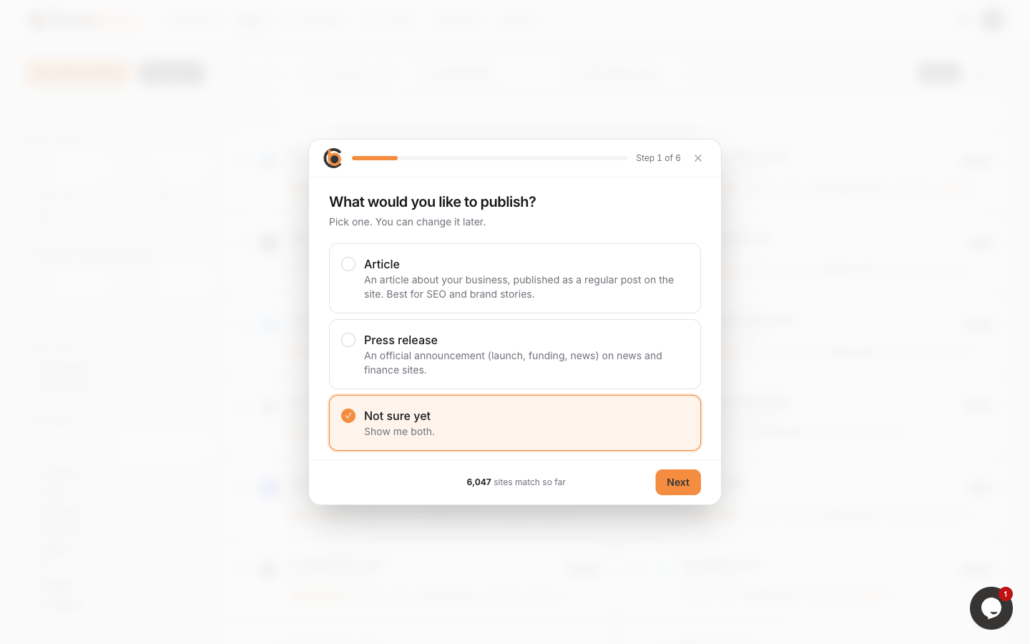
Find my sites guides you through six short questions.
The six questions, and how to answer them
1. What would you like to publish?
Your choices are an article, a press release or not sure yet. An article (also called a guest post or article posting) is a regular article about your business or topic, published on the site like its other articles. A press release is an official company announcement, such as a launch, funding round or new partnership. If your content is news with a clear date, choose press release. If it is a story, opinion or explainer, choose article. If you have not decided, pick not sure yet and compare both on the results page.
2. One site or several?
Choose one publication if you want to start small, or several if you want broader coverage in one order. Several sites also let you combine strong names with niche sites that match your audience.
3. How strong should the sites be?
This sets a minimum DR. Domain Rating is a score from 0 to 100 that estimates the strength of a site’s link profile. Higher DR usually means a more established website, and often a higher price. A mid-range minimum is a good starting point for most brands.
4. What is your budget?
Enter the most you want to spend per site. Prices are shown on every card, so you will always see the cost before you order, and placing an order costs nothing upfront.
5. Which audience?
Pick the countries where you want your readers. A local restaurant group needs local readers. A global software company may want several regions.
6. How much monthly traffic?
This question is optional. Traffic is the estimated number of visits a site receives per month, taken from third-party tools. If you do not have a view, skip it.
What you see at the end
The results appear as cards in the same layout as the main Sites page. Each card shows the site name and icon, post type, country, price, DR, monthly traffic and whether links are do-follow or no-follow. Most cards have a Sample link that opens a real article published on that site, so you can judge quality yourself. You can still use every filter to widen or narrow the list, switch to table view, or sort by DR, price, traffic or name.

Matching publications appear as cards with price, DR, traffic and link type.
From suggestions to an order
When you find sites you like, tick them. A bar at the bottom of the page shows your estimated total and a Create order button. Press it, review the summary, tick the Terms box and press Place order. After that you send your content as a Google Docs link, or ask Coneberry to write it. The team reviews it, you approve it, and you pay before publication. The help article on how Coneberry works covers the full journey.
Who the quiz is for
Find my sites suits three kinds of people in particular. First-time buyers who have never ordered a guest post or press release and want a safe starting point. Busy founders and marketers who would rather answer six questions than compare hundreds of cards. And agencies who want a quick shortlist to show a client before going into detail. The quiz also works as a learning tool: the questions show you which factors matter when choosing a publication. If you already know exactly which publications you want, skip the quiz and search by name instead.
Tips for better suggestions
- Be honest about budget. A realistic number gives realistic matches.
- Do not set DR too high. A very high minimum can leave very few results. Lower it and look at samples.
- Run the quiz twice. Try once with article and once with press release to compare.
- Use samples. Always open one or two before you order.
What the quiz cannot do
The suggestions rest on listed numbers. DR, traffic, link type and country come from third-party tools and publishers and can change. Publications are independent and keep the final editorial decision, and nobody can guarantee indexing on Google or ranking improvements. Think of Find my sites as a smart shortlist, not a promise.
Frequently asked questions
Do I need an account to use Find my sites?
No. You can run the quiz and browse the results without signing up.
Can I change my answers after seeing results?
Yes. Adjust the filters or go back. Nothing is ordered until you press Create order.
What if no sites match?
Lower the minimum DR or raise the budget, or remove the traffic filter. You can also browse the full list on the Sites page.
Does it cost anything?
No. The quiz is free, and placing an order costs nothing upfront.
Try it now
Take the Find my sites quiz or browse all publications for free, no account needed.
More step-by-step help is in the Coneberry Help Center.


