

After Publication: What to Do With Your Live Links and Reports
The moment a publication posts your article or press release is the point of the whole exercise, but it is not the end. What you do with the live links after publication decides how much a placement is worth to your brand. This guide covers where Coneberry puts your links, what the reports show and how to use each placement well.
Coneberry is a place to get articles and press releases published on real news and business websites, so your brand is seen on trusted publications, found when people search for you and included in AI answers from Google AI, ChatGPT and Copilot. You work from a free dashboard at dashboard.coneberry.com, and when a site posts your content the result lands in three places at once.
Where do your live links appear?
- In the order chat. Each live link is posted in the order’s Messages as soon as it exists.
- On the order page. Under Publishing in the Project Flow, the site’s line changes from Pending to Live and carries the link.
- On your dashboard. The wall of logos on the dashboard home shows every publication you appear on across all your orders. Click a logo to open the article.
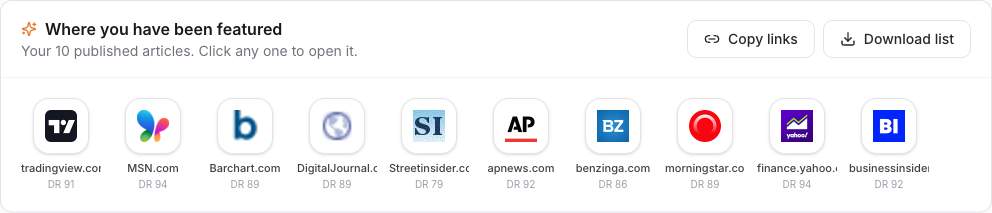
Your wall of logos shows every publication you appear on.
You do not need to ask for links; they arrive on their own. If you turned on browser notifications, you are told even when the tab is closed. Read turning browser notifications on or off to set this up.
Also worth a look: How Much Does a Guest Post or Press Release Cost? Understanding Estimates and Invoices and How Paying for Online PR Works: Invoices, Timing and Safe Payment.
How do you copy or download all your links?
The dashboard home has two buttons beside the logo wall. Copy links copies every live link, so you can paste them into an email or a document. Download list gives a CSV file you can open in a spreadsheet and share with a colleague or client. This is handy for a report to your boss or a client, since it gives you one tidy list of where you were published.
When is an order complete?
The order status moves to Completed when all links are live, and the last Project Flow step, All live, is ticked. Until then, each site has its own status, so you may see some links live while others are still being published. For how that works, see understanding order stages and the Project Flow.
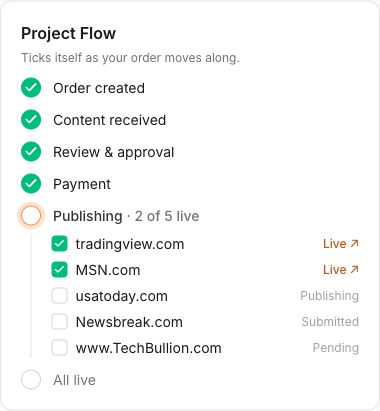
Each site in the Project Flow turns to Live as its link goes up.
What does a report show?
Packages with a distribution report include it when publishing is done. It lists where your press release appeared, with live links, so you have proof of reach in a form you can forward. To see what one looks like before you order, open a package on the PR packages page and press View sample report. For orders of individual sites, the live links on your order and the downloadable list are your record.
How do you get more from a placement?
A live article on a trusted site is an asset. A few simple habits make it work harder:
- Share it. Post the link on your website, in your newsletter and on social media. Add a “Featured in” section with the publication logos.
- Give it context. Mention it in sales emails, investor updates and pitch decks. Third-party coverage carries weight that your own pages do not.
- Keep it consistent. Brand name, spelling and description should match across your website and coverage, so search engines and AI tools connect them.
- Build on it. A press release followed by a guest post gives readers two ways to find you. See press release or guest post.
Reputation grows with repetition. Several credible mentions over time do more than one big push, and the ranking benefits of links are a welcome bonus rather than a promise. Indexing on Google and ranking changes are never guaranteed.
What if something is wrong with a live article?
Tell us in the order’s Messages with the link and what you noticed. Some publications label content as sponsored or partner content, as their policy or advertising law requires, and Coneberry never asks them to hide that. If a publisher removes an article within 90 days for a reason not caused by the content, we republish it free on the same or an equivalent site. After an article is published, refunds are not available. See refunds, replacements and cancellations.
Keeping your links healthy
Every sample link on Coneberry is checked weekly and replaced if broken, and it is a good habit to check your own live links now and then. Open your dashboard, click through the logo wall and confirm each article still loads. If you see a problem, write in the order chat with the link, so the team can follow it up.
Measuring what a placement did
Judge a placement by more than traffic. Search for your brand name and see what appears. Check the new links in your analytics for referral visits. Notice whether sales conversations mention the coverage. Over time, look at whether your brand shows up in AI answers on Google AI, ChatGPT and Copilot, which read the open web. These signals build slowly, and none of them is guaranteed, but together they show whether your reputation is growing.
Using the dashboard after the order
Your dashboard home keeps working after each order. It shows links published, orders placed, total invested and combined readership, along with milestones and suggestions for publications that are popular in your industry. Treat it as a running scoreboard for your online reputation, and come back to it whenever you plan the next release or article.
Frequently asked questions
Do I need to do anything for the link to appear on my dashboard?
No. It is added automatically when the publication posts it.
Can I get a list of all my links?
Yes. Press Copy links or Download list on the dashboard home.
Where is my invoice?
Under Payments, where every invoice is listed.
How do I order again?
Browse Sites or use the Popular in your industry suggestions on your dashboard.
Ready for your next placement?
See publications, prices and samples on the Sites page. Browsing is free and needs no account.
More step-by-step help is in the Coneberry Help Center.


