

How to Order Articles on Multiple Websites in One Go

A single article on a single site is a good start, but brand reputation is rarely built that way. When a story appears on several trusted publications, readers meet your name more than once, search engines see consistent coverage, and AI tools have more reliable sources to draw on. That raises a practical question: can you order several publications at once without a mountain of emails?
With Coneberry you can order multiple sites in one order. Pick as many publications and PR packages as you need, send your content once, and follow the results in one place. This guide shows how it works from start to finish, even if you have never used Coneberry before.
What is Coneberry?
Coneberry is one place to get articles and press releases published on real news and business websites. You browse more than 5,000 publications, choose sites or PR packages, send your content (or ask Coneberry to write it), approve it, pay, and receive live links. Everything happens in the client dashboard. You can browse without an account, and signing up is free.
Also worth a look: How to Place an Order on Coneberry: Sites and PR Packages and Sample Articles and Sample Reports: See What You Are Buying Before You Order.
Why order several sites together?
Ordering together is more than a convenience.
- One conversation. Questions go into a single order chat instead of being scattered across threads.
- One clear checklist. You see the status of every site on the same page.
- Consistent content. You can reuse the same story across publications, or give each its own version.
- Less admin. One summary, one Terms confirmation and a single invoice flow.
How to order several sites step by step
Start on the Sites page. Use the search box, the category dropdown and the filters on the left to narrow the list by price, DR, link type, country or traffic. If you are unsure where to begin, the guided quiz Find my sites suggests matches.

Tick the box on each publication card to add it to your selection.
Tick every publication you like. A bar appears at the bottom showing the estimated total. When you are ready, press Create order. The summary lists your sites, and has its own Terms tick box. Press Place order. Nothing is charged at this point.

The order summary lists every site before you place the order.
Can I mix sites and PR packages?
Yes. Articles on individual sites and press release packages serve different purposes, and many brands use both: a package for broad distribution of an announcement, plus a few chosen sites for articles that tell the longer story. Open PR packages, tick one or more, and press Order or Order all. If you are not sure which format fits, read press release or guest post: which one do you need?
How does content work across many sites?
Once the order exists, it asks whether you already have the content. You have two options.
You have the content
Paste a Google Docs link shared as “Anyone with the link: Viewer”. You can send one document that covers all sites, or a document for each site. Separate documents are useful when the audiences differ, for example a business site and a regional news site.
You want it written for you
Answer a short questionnaire about your topic, your company, your website and social links, and any links or keywords you want included. For press releases it also asks for two quotes, an About Us paragraph and a media contact. The team shares drafts in the order chat for your approval.
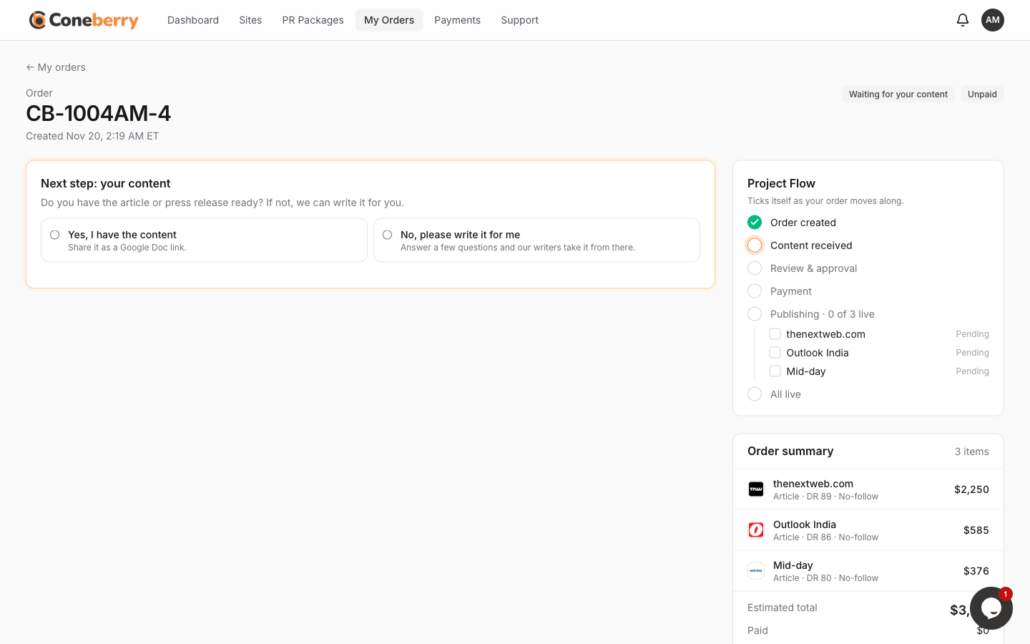
Choose between sending your own content or having it written for you.
How do you track progress with many sites?
The order page has a Project Flow checklist: Order created, Content received, Review and approval, Payment, and Publishing. Under Publishing, each site has its own line that moves from Pending to Live. A single site being slower does not hold back the others, and the order is marked complete once every site is live. Each live link is posted in the chat as it happens.
The team usually reviews content within one working day, and nothing is published without your approval. You pay the full invoice before publication. Card details are never requested by email or chat; you pay through a secure page opened by Pay now.
What if one of the sites says no?
Publications set their own editorial rules, so occasionally one declines. When that happens you choose between a replacement site of equal or greater value and a full refund for that site. The rest of your order carries on. If you change your mind, you can cancel with a full refund before work starts, or cancel the sites not yet sent to a publication after work begins. No refund applies once an article is published.
Tips for building a good multi-site selection
A longer list is not automatically a better one. A balanced selection usually works best: a few publications that match your industry, a few that reach your target country or region, and one or two with broader readership. Mixing DR levels and categories gives your coverage a natural look and spreads your reputation across audiences.
Check each card’s sample article before ticking it, since the Sample link opens a real published piece so you can judge tone and quality. Look at the post type too: some sites publish Articles and others press releases, and the tabs at the top of the Sites page filter between them. If a publication handles regulated topics, make sure your subject is accepted there.
Finally, decide on timing. If you need everything live for a launch date, tell the team in the order chat when you place the order, so they can plan around it. Turnaround differs by publication and is not guaranteed.
Frequently asked questions
Is there a limit to how many sites I can add?
Tick the sites you need and see the estimated total in the bottom bar. For a very large selection, you can also split it into several orders by campaign.
Do all sites publish on the same day?
Not necessarily. Each publication has its own schedule, so the lines under Publishing turn Live at different times.
Will the final price match the estimate?
The bar shows an estimate. Your invoice is the final amount you pay, and it is added after your content is approved.
Can I use different content on each site?
Yes. Send one Google Docs link per site, or describe the differences in the questionnaire.
Start building your selection
Browse the publications for free, tick the ones that fit your brand and see the estimate update as you go. No account is needed to look around: open the Sites page.
More step-by-step help is in the Coneberry Help Center.


