

PR Packages Explained: How One Press Release Reaches a Whole News Network
You have news worth sharing: a launch, a funding round, a partnership, an award. Getting it onto one news site is a project. Getting it onto dozens is a full-time job. That is the problem PR packages solve: you submit one press release, and it is distributed across a whole network of publications for one price.
Coneberry is a place to get articles and press releases published on real news and business websites, so your brand is seen on trusted publications, found when people search for you, and picked up in AI answers from Google AI, ChatGPT and Copilot. PR packages are the fastest route for the press release half of that. This guide explains what a package is, what is inside it and how to choose one.
What is a PR package?
A PR package is a bundle of publication placements sold as one product. Instead of picking sites one by one, you pick a network, send your press release once and the network publishes it on its member sites. Everything happens in your free account at the PR packages page, and you can browse the packages without signing up.
Also worth a look: How to Order Articles on Multiple Websites in One Go and How to Place an Order on Coneberry: Sites and PR Packages.
It helps to know the difference from a single-site order. With individual sites you choose each publication yourself, which suits a guest post or article aimed at a specific audience. With a package you trade that control for reach: you get a wide spread of outlets at once, which suits an announcement you want seen in many places.
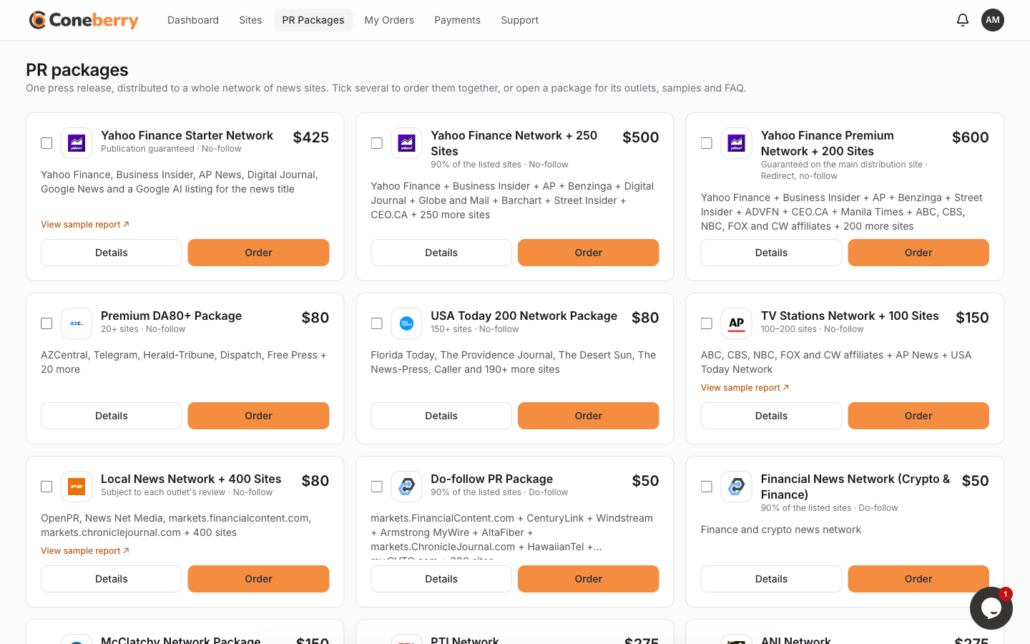
The PR packages page lists each network with its price and an Order button.
Which kinds of packages are there?
Packages are grouped into families, each built around a type of audience:
- Yahoo Finance networks: your release appears on Yahoo Finance and finance and business sites such as Business Insider and AP News. They range from a starter network to a premium network of 200+ sites. These suit companies speaking to investors, customers and the business press.
- US local and TV news networks: local news sites and station sites of networks such as FOX, ABC, NBC, CBS and CW. Good for reaching communities and regional audiences.
- StreetInsider and Barchart packages: finance-focused outlets read by traders and investors, plus a starter package for smaller budgets.
- Crypto and supplements: many outlets refuse these categories. This package exists for brands that are turned down elsewhere.
- Indian news networks: PTI, ANI, Super 100 and Super 200, with The Week, The Print, The Tribune and hundreds of Indian news sites.
- AI Search Listing: your news listed so it can surface in AI answers on Google AI, ChatGPT and Copilot.
Prices are shown on each package card, so you can compare them before you decide.
What should you check before ordering?
Press Details on any package. The details page covers the items that decide whether a package fits your release:
- Outlets: the publications in the network and examples of where releases appeared.
- What is guaranteed: for example a minimum share of the listed sites.
- Link type: whether links in the release are do-follow or no-follow. Our guide to do-follow and no-follow links explains the difference.
- Words, images and links: how long the release can be, how many pictures it can carry and how many links are allowed.
- Guidelines and FAQ: rules about topics, tone and format.

The Details view shows outlets, guarantees, link type, limits and guidelines.
Metrics and outlet lists come from publishers and third-party tools, so treat them as a guide rather than a promise. Indexing on Google and ranking changes are never guaranteed.
Can you see proof before you buy?
For most packages, yes. Press View sample report to open a real distribution report from an earlier press release. It lists the live links, so you can see the kind of outlets and the reach the package tends to deliver. The exact outlets can vary from one release to the next, but the report shows the real shape of the result.
How do you order a package?
- Open the PR packages page and press Order on the package you want. To buy several, tick them and press Order all.
- Check the summary, tick the Terms box and press Place order. This costs nothing upfront.
- Send your press release as a Google Doc, or ask Coneberry to write it for you.
- Our team reviews it, usually within one working day, and shares a preview if needed. Nothing is published without your approval.
- You pay the invoice in full, then the release is distributed. Live links appear on your order, and packages with a report include it when publishing is done.
If you are new to the format, read how to write a press release that gets published first.
Who gets the most from a package?
Packages work best when the goal is visibility for a piece of news rather than a single carefully placed story. Typical cases include a product launch, a funding or acquisition announcement, an award, a new hire at senior level, an event or a partnership. In each of these, being seen in many places at the same moment is more useful than one long article on one site.
They also help when you want your brand name to appear in the places people look when they check a company. Journalists, customers, investors and AI search tools all read the open web, and a release carried by several established publications gives them more to find. That is reputation and authority at work, and better search rankings from the links are a welcome bonus rather than a promise.
Common mistakes to avoid
- Sending an advertisement. A press release needs real news in the first paragraph. Pure promotion is the quickest way to be declined.
- Ignoring the limits. Each package states its word count, images and links. Content outside those limits slows the review.
- Choosing a network that does not match the topic. A finance network suits business news; a local news network suits community news.
- Expecting identical results every time. The sample report shows a real example, but outlets can vary from release to release.
If you are unsure which family suits you, ask in the live chat at the bottom right of the dashboard on a computer or tablet, or write to support@coneberry.com. Replies usually come within one working day.
Frequently asked questions
Is a package better than individual sites?
Neither is better in general. Packages give reach and speed for announcements. Individual sites give control over where a guest post or article appears.
Will my release appear on every outlet in the network?
Not necessarily. Packages state what is guaranteed, often a minimum share of the listed sites. Check the Details page and the sample report.
Can my release be labelled as sponsored?
Some publications label content as sponsored or partner content. Coneberry never asks them to hide that.
What if I have no press release written?
We can write it for you. Pick No, please write it for me on the order page and answer a short questionnaire.
Ready to look?
Browse the networks and sample reports on the PR packages page, or explore individual publications on the Sites page. Browsing is free and needs no account.
More step-by-step help is in the Coneberry Help Center.


