

How to Place an Order on Coneberry: Sites and PR Packages
Buying media coverage sounds complicated: which sites, what content, who pays when, and what if something goes wrong? On Coneberry the process is a handful of clear steps, and placing an order costs nothing upfront. This guide walks through exactly how to place an order, for individual sites or for a press release package, so you know what to expect before you start.
Coneberry is one place to get articles and press releases published on 5,000+ real news and business websites, so your brand builds reputation and authority online. You work in a client dashboard at dashboard.coneberry.com, and placing an order is the first step. Here is how it goes.
Before you order: browse for free
You do not need an account to look around. The Sites page shows every publication as a card or a table, with tabs for Articles and Press releases. Each card lists the country, price, DR (a measure of website authority), monthly traffic and whether links are do-follow or no-follow. A Sample link opens a real published article, so you see what you would get.
Also worth a look: Sample Articles and Sample Reports: See What You Are Buying Before You Order and Find My Sites: A Six-Question Quiz to Choose Where to Publish.

Each site card shows its country, price, DR, traffic and link type, with a Sample link.
If you are not sure where to start, the Find my sites guide asks six short questions and suggests matches. Our article on finding the right sites covers filters and sorting.
Option 1: Order individual sites
Choose this when you want articles or press releases on specific publications.
- On the Sites page, tick the box on each site you want. Use the Articles or Press releases tab, the category dropdown, search and the filters on the left to narrow the list.
- A bar appears at the bottom with your estimated total and the sites you picked.
- Press Review to see the list, remove a site or check prices.
- Press Create order.
- A summary opens. Tick the box that says you agree to the Terms of Service, then press Place order.
If you are not signed in, the dashboard asks you to log in or sign up first and keeps your selection. Creating a free account takes a minute, with Google or an email address.
Option 2: Order PR packages
A PR package distributes one press release to a whole network for one price. The PR packages page lists them: Yahoo Finance networks, US local and TV news networks, Barchart and StreetInsider packages, Indian news networks, a crypto and supplements package, and AI Search Listing.
- Press Details on a package to see its outlets, what is guaranteed, link type, words, images, links and guidelines. Use View sample report to see a real distribution report.
- Press Order for one package. To order several, tick them and press Order all in the bar at the bottom.
- Check the summary, tick the Terms box and press Place order.
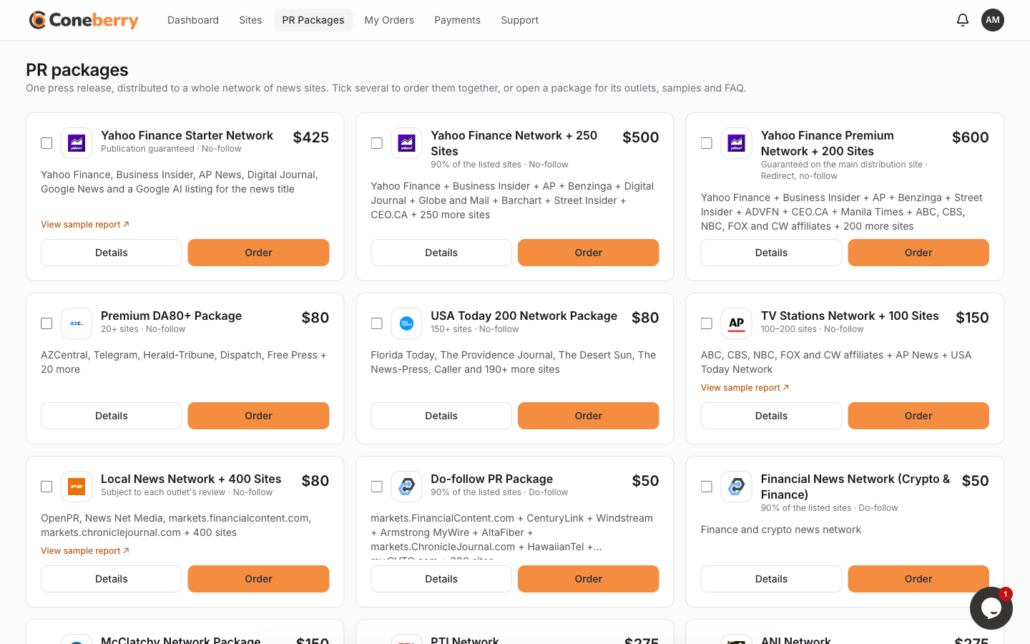
Each package card has Details and Order buttons, and you can tick several to order together.
For more on how packages work, see PR packages explained.
What does it cost to place an order?
Nothing. Placing an order is a request, not a payment. The price you saw is fixed in your order at that moment. After you send your content, the team reviews it, usually within one working day, and then an invoice appears on your order. You pay only then, in full and in advance of publication, through a secure payment page. Card details are never asked by email or chat. See Payments and invoices.
What happens right after you order
Your order gets a number such as CB-1001JD-1 and its own page. You receive an Order received email, and the page shows a Project Flow checklist: Order created, Content received, Review and approval, Payment, Publishing. There is also a Messages chat where you can talk to the team, send links and files up to 10 MB.
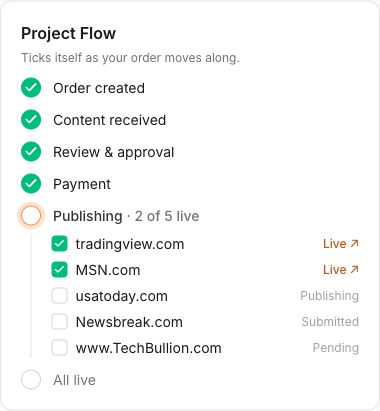
The Project Flow checklist shows exactly where your order is.
Your next step is to provide content. The order asks “Do you have the content?” You have two choices:
- Yes, I have the content. Paste a Google Docs link shared as “Anyone with the link: Viewer”, then press Submit content.
- No, please write it for me. Answer a short questionnaire, and the team shares a draft in the chat for your approval.
Details are in Sending your content and No content yet? We write it for you.
Tips for a smooth first order
- Check the samples. Opening the Sample link takes seconds and prevents surprises.
- Match site to topic. If your topic is finance, crypto or health, read Restricted topics first.
- Start small if unsure. You can order again at any time, and each order is separate.
- Know the limits. DR, traffic and similar numbers come from third-party tools and can change, and indexing on Google or ranking gains are never guaranteed.
- Ask early. Use the order’s Messages or the live chat if anything is unclear.
Changing or cancelling
If you cancel before content or work starts, you receive a full refund. After work has started, you can cancel sites not yet sent to a publication and they are refunded. If a publication declines your content, you get a replacement of equal or greater value, or a full refund for that site. There is no refund after an article is published. Read our refund guide for details.
What if you need help while ordering?
You are never on your own. A live chat bubble sits at the bottom right of the dashboard on computers and tablets, and you can open a support ticket from the Support page or email support@coneberry.com. Replies usually arrive within one working day. Once the order exists, its Messages chat is the best place for questions about that order, because the team sees all the details there.
Frequently asked questions
Do I need an account to place an order?
You can browse without one, but you need a free account to place an order. Your selection is kept while you sign up.
When do I pay?
After your content has been reviewed and before it is published. You get an invoice on the order page, and Pay now opens a secure page.
Can I order several sites and packages at once?
Yes. Tick as many as you like. Our guide to ordering several sites or packages in one order explains how it works.
Can I order the same site again?
Yes. Each order is separate.
Place your first order
Start by browsing, free and without an account, on the Coneberry Sites page, and tick the publications you like.
More step-by-step help is in the Coneberry Help Center.


